My sitemap said "Success". Google had indexed 32 pages out of 345.
Search Console showed "Success" for my sitemaps, yet Google had indexed only 32 pages out of 345. How I found out, plus Indexing API, Bing, IndexNow and GEO.
Too long to read?
Send it to your agent.
It checks your site with my guide and tells you what to fix.
Check my website by following this guide: https://alexisamz.com/agents/audit-site.md

Read it fully before acting, then ask me for my website address.
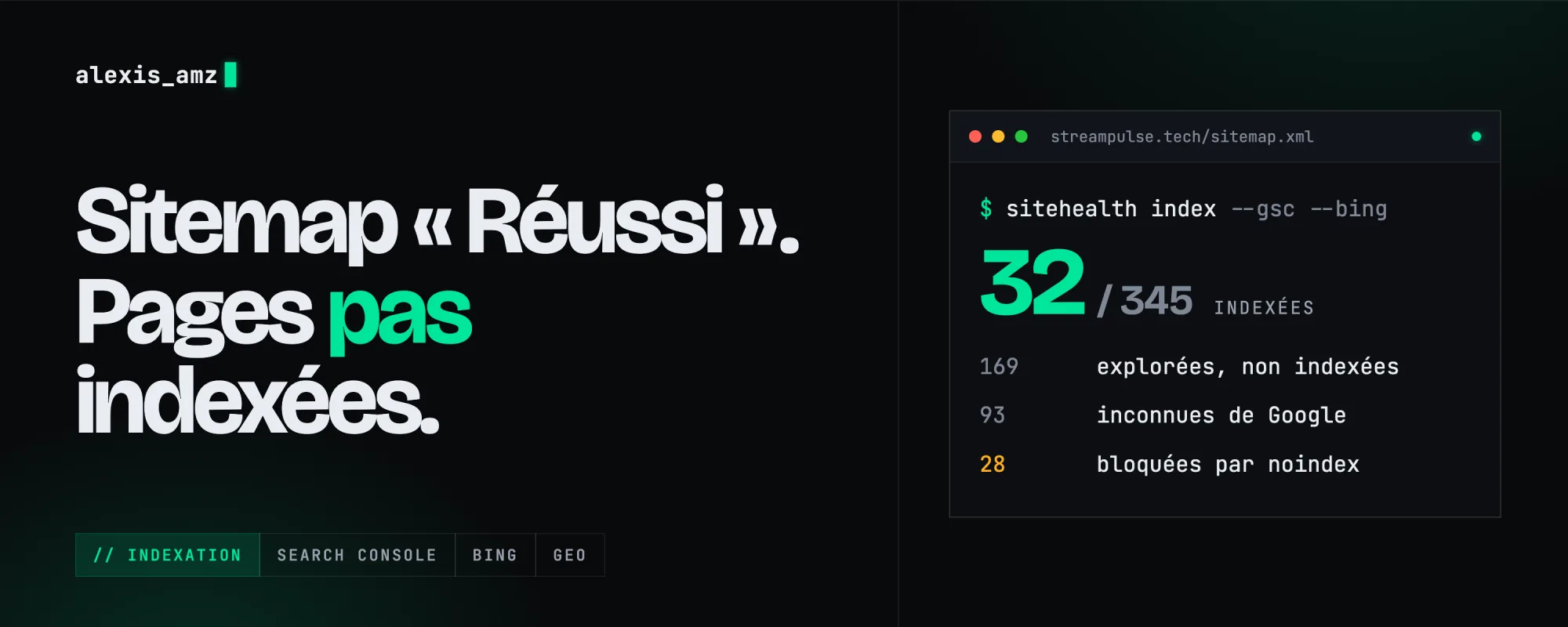
In Search Console, all my sitemaps had the "Success" status. I checked the pages one by one. On my main site, 345 pages in the sitemap, 32 indexed. On the hair salon's site, 8 pages, a single one indexed. Here's how I found out, and everything I set up afterwards.
"Success" doesn't mean "indexed"
That status only means Google could read the file, not that it kept the pages. To know what's really indexed, you need "URL Inspection". By hand, that's one page at a time. With the API, 2,000 a day per site, and Google gives the reason for every rejected page. On my site:
| Google status | Pages | What it means |
|---|---|---|
| Crawled, not indexed | 169 | It read the page and decided not to keep it. |
| Unknown | 93 | It never visited it. |
| Excluded by noindex | 28 | It saw an old version where I was blocking the page. |
| Discovered, not indexed | 19 | It knows the page exists, it hasn't come yet. |
The 169 rejected pages aren't fixed by submitting them again. In my case, it's probably because many pages are the same page in 11 languages. That calls for reworking the content.
Creating the Google service account
To use Google's APIs, you need a service account: a robot account with its own email address. This is the step where everyone gets stuck.
The project
- Go to
console.cloud.google.comwith the Google account of your Search Console. - At the top, next to the logo, click the project picker, then "New project". A name is enough, no credit card needed.
- Make sure this project is selected before going on. I got it wrong the first time.
The APIs
- In the main menu: "APIs & Services", then "Library".
- Enable "Google Search Console API", then "Web Search Indexing API".
If you forget, your scripts get a 403 error mentioning a "disabled" API.
The account and its key
- In the main menu: "IAM & Admin", "Service Accounts", then "Create service account".
- Give it a name. The address is created for you (
[email protected]). Copy it. - "Create and continue". The suggested roles are useless here, skip them. Then "Done".
- Open the account, "Keys" tab, "Add key", "Create new key", JSON format. The downloaded file is the key. Never in a Git repository, never sent to anyone.
If Google refuses to create the key, it's a security policy on recent Google Workspace accounts. You can turn it off in "IAM & Admin", "Organization Policies" (look for "Disable service account key creation"). Or create the project with a personal Gmail.
Access in Search Console
- For each site: "Settings", "Users and permissions", "Add user".
- Paste the service account address and pick "Owner". The Indexing API rejects everything otherwise.
I had done it on 3 sites out of 6 without noticing. And one site took a few minutes to show up on the API side after I added it: if it doesn't work right away, wait a bit.
What to know about the Indexing API
It's 200 URLs a day, across all your sites. And Google officially reserves it for job postings and livestream videos: on a regular page it often brings the crawler faster, with no guarantee. A few days earlier I had prepared a submission schedule. Checking with the API: 0 URLs sent out of 368. I had never run it. Now my schedule is a file I import into my calendar, with the command for each day.
Bing, the one everyone forgets
Bing's index also powers DuckDuckGo, Ecosia, Yahoo and ChatGPT's web search. On bing.com/webmasters, "Import from Google Search Console" brings in all your sites at once, already verified. For the API: the settings gear, "API access", then "API key", one key for all sites. On a Mac, I keep it in the Keychain:
security add-generic-password -a "$USER" -s bing-webmaster-api -w
(I first pasted mine into a chat. If that happens to you, regenerate it.)
IndexNow, the simplest of all
- Make up a key: a string of letters and numbers.
- Put a
your-key.txtfile containing the key at the root of the site (inpublic/on Next.js). - Open
yoursite.com/your-key.txt: you should see the key, not an error page. - Send your URLs in one request:
curl -X POST https://api.indexnow.org/indexnow \
  -H "Content-Type: application/json; charset=utf-8" \
  -d '{"host":"yoursite.com","key":"your-key",
       "urlList":["https://yoursite.com/","https://yoursite.com/page"]}'
Bing, Yandex, Seznam and Naver are notified. Google doesn't take part. The first response is 202 instead of 200: that's normal, the key is being validated. Send the whole site once, then only what changes.
Changing domains
When I moved from .fr to .tech, I looked for Bing's "Site Move" tool that every tutorial mentions. It doesn't exist anymore. What matters are permanent redirects page by page: old.fr/page to new.tech/page, not to the homepage. On Google, "Change of address" still exists, in the old site's settings.
GEO: getting cited by AI
GEO means making sure ChatGPT, Perplexity or Gemini understand your site and cite it. Nobody can guarantee it, but there are basics.
Be in the indexes they use
- ChatGPT (search) and Copilot rely mostly on Bing.
- Gemini and AI Overviews rely on Google.
- Perplexity has its own crawler and uses other indexes.
So everything above is already GEO.
Don't block their crawlers
Each AI has several crawlers, which you can allow or block one by one in robots.txt. You can refuse training and still be citable:
| Crawler | What it does |
|---|---|
| OAI-SearchBot | ChatGPT search. This is the one that gets you cited. |
| GPTBot | Training for OpenAI's models. |
| PerplexityBot | Perplexity's index. |
| ClaudeBot | Training for Anthropic's models. |
| Google-Extended | Use by Gemini, with no effect on Google Search. |
Check your firewall too: Cloudflare has an option that blocks AI crawlers.
An llms.txt file
A small Markdown file at the root that sums up the site and lists the key pages. Not an official standard, Google doesn't use it, but some AI tools read it and it takes ten minutes. This site's one is here.
# MySite
> One sentence that says what it is and who it's for.

## Main pages
- [Feature X](https://yoursite.com/x): what it does.
- [Pricing](https://yoursite.com/pricing): the real prices.
Write pages people want to cite
An AI quotes a sentence that answers a question on its own. "Works on Chrome, Edge, Brave and Opera" can be quoted as is. "Compatible with all browsers" says nothing, so nobody picks it up.
To measure it, I regularly ask ChatGPT and Perplexity the same questions, and I look at visits coming from chatgpt.com in my analytics.
All of this is what my amz-site-health skill now does for me (the full toolkit). Next post: Impeccable, the design skill I install everywhere.
Website, photo shoot or video.
Let's talk.